
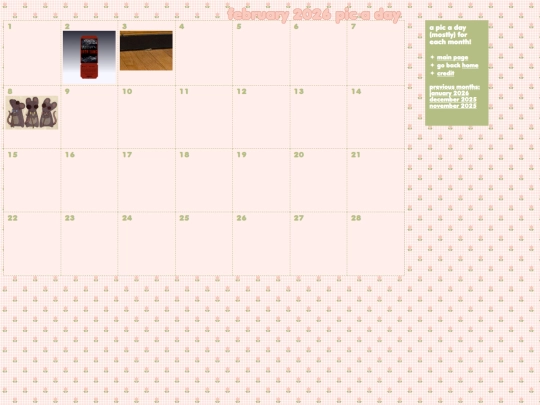
okay, i have a dev question: i have multiple pages i want to use as iframes. i want these iframes to open in a div when their link is clicked. how is this accomplished? is it a javascript thing?




7 likes
2 likes
 willdotjpg
2 weeks ago
willdotjpg
2 weeks ago
- created the pic-a-day page for august - added new cliques to the collections page - updated the about page
4 likes
1 like
i... just realized that the meadow.cafe guestbook has a reply function. i have had this guestbook since june of last year. if you've ever left me a guestbook message and i haven't replied, i am SO sorry,,,
2 likes
oh my god, thank you for 200 followers!! that's crazy! ♥️
4 likes

2 likes

hey! i just wanted to say i loved looking through your site, and i ADORE your rtvs shrine. :) thanks so much for the shoutout on your links page!
1 like

5 likes
willdotjpg
1 month ago
if you're the person who kindly let me know that the images for this page were missing, thank you so much!! it's been fixed! :)
1 like
willdotjpg
1 month ago
also, a COMPLETE overhaul of my NTBTS shrine! it was long overdue since my skills have improved considerably since i made the last one.
1 like


![[tfpXE] avatar](/site_screenshots/15/25/tfpxe/index.html.50x50.webp)


![.:.[heather saturnia].:. avatar](/site_screenshots/11/46/heathersaturnia/index.html.50x50.webp)


![[ Aegi's Cafe ]
avatar](/site_screenshots/40/61/aegi/index.html.50x50.webp)


to be clear, i'm trying to optimize my pic-a-day calendar pages so that the individual months can be opened in a div on the main page rather than having to click through multiple pages.
Sometimes I just do in html to keep js file short and simple. Just assign name attribute to your iframe and point the target to anchor. Or in js just update the src att inside of iframe. Works the same.
But for your case, using fetch is the most effective. Make separate htmls for months and load them in separate divs, onclick.
your links to the iframe pages need to have target="div-name" and the div the pages will end up inside needs to have name="div-name"
also you can put this in ur head tag if u want all the links to go to the same div^_^
it ate my example lolll. it's the html tag base with the attribute target="div-name" in it. srry for all the comments gl heh
ok atp im spamming but i cant not say that that is a genius use of iframes i love it.......
you'll need a main page 'picaday.html', a div container for your calendar(where the iframe will go) and the sidebar menu with your links that will have "target="calendariframe" to the iframe name. exmpl: < iframe name="calendariframe " src="(leave this blank or whatever month when the page loads) " class=" iframe "> < /iframe >
in your CSS make .iframe and add some a basic width: 100%; height: 100%; border: none; position: absolute; so it fits nicely in the .calender container i hope this explanation is easy enough to understand. :V
thank you all so much TvT i really appreciate the help and input